You are here: Saving > Saving an AOF Document


Saving an AOF Document

Saves the entire active scene as an .aof object. Does not replace or close the file you are currently working on.
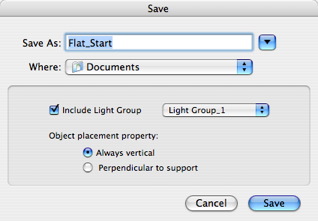
  1. Include light group:
  • Choose the light group you wish to save with the object. This group will automatically be integrated into the project in question.
  1. Object position:
  • Always vertical to project regardless of the surface to which it is applied. (a vehicle, for example)
  • 90° Perpendicular to the surface on which it is placed.


Artlantis User Guide : Saving an AOF Document

© 2008 Abvent www.artlantis.com