You are here: Shaders > Basic Shader


The Basic Shader

Materials List: displays the materials of the scene.
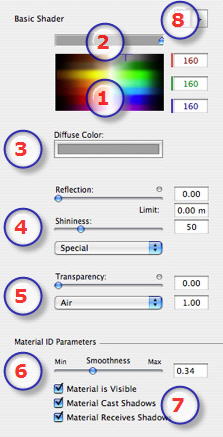
  1. Color Selector:
  • Click to select a diffusion color or enter numerical values (1 to 255) in the RGB fields.
  1. Saturation:
  • Use the slider to choose the color saturation level.
  1. Diffusion Color:
  • Another way to select a color is to click to choose a color from the system color picker.
  1. Reflection, Shininess
  • Reflection: Drag the slider. When the diode is red, the material reflects its environment or enter a value in the related field. Click on the diode to cancels the material reflection.
  • Limit: Entering a Limit value defines the maximum distance of the reflection.
  1. Transparency:
  • Move the slider to give the material transparency or enter a value in the related field. Click on the diode to cancels the transparency effect.
  • To associate a refraction index with transparency, select an index from the drop-down menu (air, plastic, water, etc) or enter a value in the appropriate field.
  1. Material ID Parameters:
  • Use the slider to choose the smoothness level for the material.
  1. Material Characteristics:
  • The material is visible or invisible.
  • The material either projects shadows or it does not.
  • The material either receives shadows or it does not.
  1. Shader/Textures Navigator:
  • For a material, this makes it possible to navigate between related Shader and Textures editors.

Add Textures


Artlantis User Guide : Basic Shader

© 2008 Abvent www.artlantis.com