You are here: Objects > Billboards


Billboards

Billboards are composed of a surface plane and an image.

Availability:

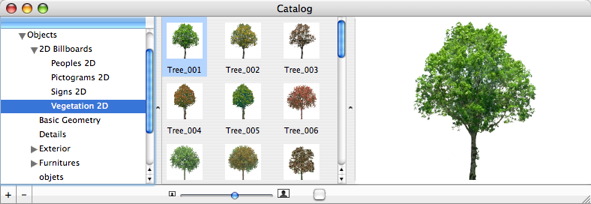
Available in the Catalog Manager, "2D Billboards" folder.
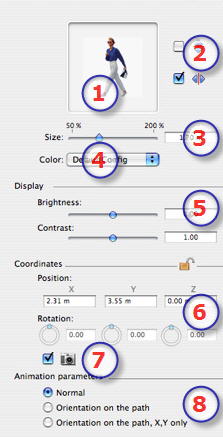
Two types of Billboards

  1. Preview Thumbnail.
  2. Mirror horizontal and/or vertical.
  3. Size of the element:
  • Using the slider or by entering a value in the field (to go beyond the limits of the slider, type in a value. The values of the slider will be updated accordingly).
  1. Color:
  • Use the menu to change the color.

Display: Display Parameters in Preview

  • Brightness: for changing brightness values from -0.25 to 0.25.
  • Contrast: for changing contrast values from 0.5 to 1.5.

Coordinates:

  1. Position:
  • Provides the x,y,z coordinates for the object's anchor point. Entering new values redefines the position.
  • Clicking onlocks the coordinates and clicking on unlocks them.
  1. Rotation:
  • X, Y, Z Rotation: Pivots the object.
    Shift+click and dragging the cursor restricts the movement to 15° step.
  • Check to restrict the billboard to always face the camera.
  1. Animation Parameters:


Artlantis User Guide : Billboards

© 2008 Abvent www.artlantis.com