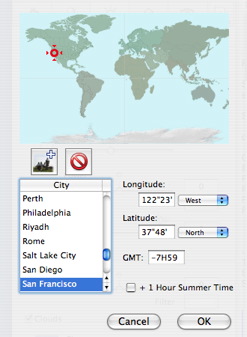
World Map
- The chosen city is circled in red. Clicking on the map points to the closest city.
-
 creates a "New City": creates a "New City":
- Double click on "New City" to rename it. Adjust the longitude and latitude parameters.
 NB: Alt+click to edit the longitude and latitude of the current city. NB: Alt+click to edit the longitude and latitude of the current city.
The mouse wheel provides dynamic zoom capability.
-
 deletes a city deletes a city
City
- Lists all cities. Clicking on a name selects this city and the position is instantaneously effective on the world map.
Longitude and latitude
- Geographic position of the current city.
GMT
- Time difference (Greenwich Mean Time).
+ 1 in summer
|
 The City Editor