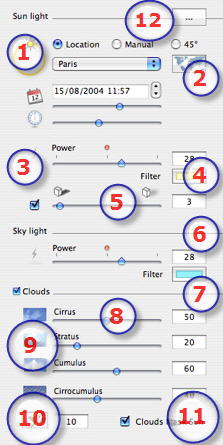
Sun Light:
- Rays of the sun projections: Location, Manual or 45°.
- Location: Select a city from the local menu.
- City Editor: to edit the list of cities.
- Set date and time:
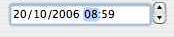
- Either by clicking on the arrows, or numerically editing the date in dd/mm/yyyy format or time in hh:mm format, or moving the appropriate sliders .
- Sunlight Power:
- Move the slider or type in a percentage value in the field. Clicking on the red diode resets the power to its initial value.
- Color Filter:
- Click on the color box to change the color of the light coming from the sun. All scene elements receiving the light projected will be tinted with this color.
 NB: Does not tint the sky. NB: Does not tint the sky.
- Shadows:
- The heliodon can cast shadows. The slider enables you to vary the shadows from hard to soft.
Sky Light:
- Sky Light Power:
- Move the slider or type in a percentage value in the field. Clicking on the red diode resets the power to its initial value.
- Color Filter:
- Click on the color box to modify the color of the light coming from the sky.
NB: Tints the scene elements but not the sky.
Clouds:
- 4 types of clouds: Cirrus, Stratus, Cumulus and Cirrocumulus.
- Move the slider or type a value into the numeric field to vary the size of the clouds.
-
 Example: Heliodon Sky Edition. Example: Heliodon Sky Edition.
- Cloud distribution:
- Click on
 to vary the distribution of the clouds or enter a value in the numeric field. to vary the distribution of the clouds or enter a value in the numeric field.
- Clouds mask sun:
- If the box is checked, the sun remains behind the clouds. The sun rays will not be projected.
- Click to open the Advanced Parameters dialog: pollution, halos, fog
NB: Clouds are visible in the current view if the Helidon Sky option is set in the Viewpoints inspector. 
|
 12 - The Heliodons Inspector
 Heliodons List: for handling heliodons on the list shown.