You are here: Heliodons > Advanced Heliodon Parameters
Advanced Heliodon Settings
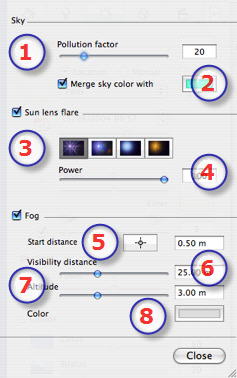
Sky:
Pollution factor:
Move the slider or type in a percentage value in the field.
Merge Sky Color With:
Check the box to activate/deactivate the effect. Click the colored box to choose a color. The color is mixed with the calculated sky color.
Sun lens flare:
Check the box to activate/deactivate the effect.
Choose effect: Click on one of the 4 thumbnails.
Lens Flare Power:
Move the Power slider or type in a value between 0 and 100%.
Fog:
Check the box to activate/deactivate the effect.
Set Fog Parameters:
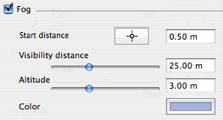
Starting distance: Click on . Then, in the Preview window, click on the point from which the fog will be able to be perceived, or enter a numeric value in the field.
Visibility distance: Visibility distance begins at the starting distance. It provides the fog with a volumetric effect.
Altitude: Altitude takes effect from bottom to top. It depends upon the starting distance and the visibility distance.
 Advanced Heliodon Settings
 . Then, in the Preview window, click on the point from which the fog will be able to be perceived, or enter a numeric value in the field.