You are here: Rendering > VR Object Rendering Parameters


VR Object Rendering Settings

Accessible by:

The set values determine the rendering and display in the Preview window.
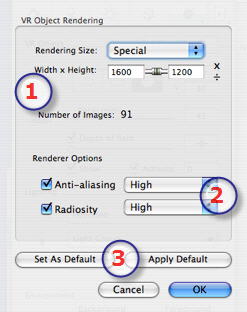
"Photorealistic" engine rendering options:

Document sizes:

  1. Rendering size:
  • Number of images: İnformation on the number of images to be rendered to make up the VR objects depending on vertical and horizontal step.
  1. Renderer Options
  • Anti-aliasing: Anti-aliasing Low/High.

Tip: To save calculation time, select a low value while increasing the Width/Height of the rendering.

  • Radiosity: The calculation times depend on the Low/Medium/High value chosen.

Approach Tip: Calculate small-sized images or use the Batch Rendering command.

  1. Set as Default / Default settings:
  • Enables you to return to the initial parameters of Artlantis or to set the current settings as the default, respectively.


Artlantis User Guide : VR Object Rendering Parameters

© 2008 Abvent www.artlantis.com