You are here: Post production > Post-Production Filters


Post-Production Effect Filters

Enables the user to apply effect filters to the current view:
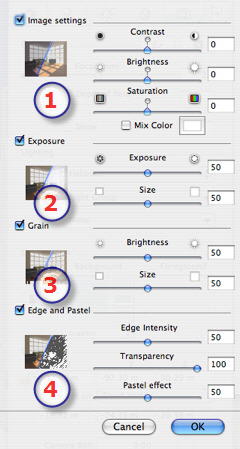
  1. Image settings:
  • Use the sliders or enter numeric values to set Contrast, Luminosity and Saturation. Values from -100 to 100.
  • Clicking on the red diode cancels the effect.
  • The Mix Color box enables you to select a tint mix from the color picker, which will cover the entire image.
  1. Exposure:
  • Exposure: Determines the amount of light that enters the camera.
  • Size: Fluffs the effect more or less.
  • Values from 0 to 100 for these two settings.
  1. Grain:
  • Brightness: Gives the image a granular appearance.
  • Size: Determines the size of the grains.
  • Values from 0 to 100 for these two settings.
  1. Edge and pastel:
  • Provides a photorealistic rendering mixed with crayon, or a completely crayoned rendering.
  • Edge intensity: Marks more or less the weight of the lines that determine the geometry contours.
  • Transparency: More or less masks the geometry while retaining the intensity of the contour and the pastel effect.
  • Pastel Effect: Provides a crayoned rendering effect.
  • Values from 0 to 100 for these three settings.
  • Validate or cancel these settings to close the dialog again.

NB: Post-production effects are immediately visible in the Preview window.

When rendering, Artlantis always calculates in photorealistic rendering and applies the filters when the calculation is finished.

Examples of Renderings:


Artlantis User Guide : Post-Production Filters

© 2008 Abvent www.artlantis.com