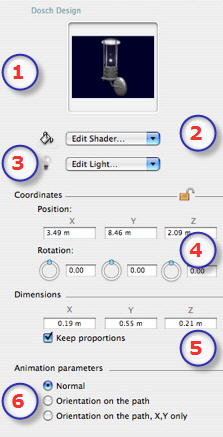
- The Preview thumbnail.
- Edit Shaders...
- Choose the material to edit from the list, the Objects inspector switches to Shaders mode.
- Light Objects...
- Choose the light to edit from the list, the Objects inspector switches to Lights mode.
- X, Y, Z Coordinates
- Position: Provides the x,y,z coordinates for the object's anchor point. Entering new values redefines the position.
- Clicking on
 locks them and clicking on locks them and clicking on  unlocks them. unlocks them.
- Rotation : Pivots the object.
Shift +click and dragging the cursor restricts the movement to 15° step.
- Dimensions : For changing the following parameters: length, width, height.
- Click on the checkbox to maintain the proportions. Clicking again removes the restriction.
- :
 NB: using the Timeline, in a single sequence, the object can change behavior several times. NB: using the Timeline, in a single sequence, the object can change behavior several times.
NB: A light object's light cannot be deleted in the Lights inspector list. This must be done from the Objects list.
|
 Light Objects