You are here: Objects > Vegetation Objects


Vegetation Objects

Available in the media manager "Free VB Visual Plants Samples" Vol. 1 and 2.
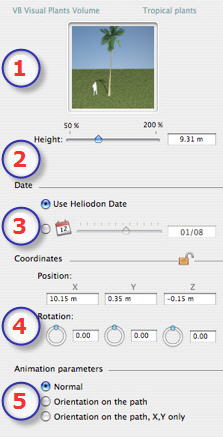
  1. Preview thumbnail.
  2. Height:
  • Using the slider or by entering a value in the field.

NB: When the slider is at the end, typing a higher numerical value allows the sizes to go beyond the end. The values will be updated accordingly.

  1. Representation date:
  • Choose: active heliodon date or calendar date.
  • Heliodon Date: use the date of the active heliodon
  • Calendar: use the chosen date.
  1. Coordinates
  • Position: Provides the x,y,z coordinates for the object's anchor point. Entering new values redefines the position.
  • Clicking on locks them and clicking on unlocks them.
  • Rotation : Pivots the object.
    Shift +click and dragging the cursor restricts the movement to 15° step.
  1. Animation Parameters:

NB: using the Timeline, in a single sequence, the object can change behavior several times.

Working in the Timeline Window

Manipulating Paths in 2D View

List of Parameters that Can and Cannot be Animated


Artlantis User Guide : Vegetation Objects

© 2008 Abvent www.artlantis.com