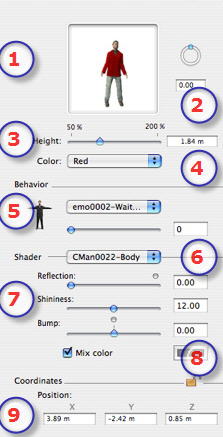
- Preview Thumbnail.
- Rotation:
- Pivot the object on itself or enter a numerical value.
Shift +click dragged with cursor limits the movement to a step of 15°.
- Height:
- Using the slider or by entering a value in the field.
 NB: When the slider is at the end, typing a higher numerical value allows the sizes to go beyond the end. The values will be updated accordingly. NB: When the slider is at the end, typing a higher numerical value allows the sizes to go beyond the end. The values will be updated accordingly.
- Color:
- Use the menu to choose the clothing color.
Behavior
- Behavior:Use the menu to choose the character's attitude: standing, sitting, running, etc.
Shader:
- Shader
- Choose the material to edit from the list.
- Reflection, Shininess, Bump:
- Reflection: Drag the slider. When the diode is red, the texture reflects its environment. Double click on the red diode to cancel the effect.
- Shininess: Drag the slider to make the material become bright or enter a value in the related field.
- Bump: Drag the slider to apply bump to materials or enter a value in the related field. Double click on the red diode to cancel the effect.
- Mix Color:
- Check and click on the selector to choose a color.
Coordinates
- X, Y, Z Coordinates
- Position: Provides the x,y,z coordinates for the object's anchor point. Entering new values redefines the position.
- Clicking on
 locks them and clicking on locks them and clicking on  unlocks them. unlocks them.
|
 Animated Character Objects