You are here: Site Insertion > Site Insertion Tool


15 - The Site Insertion Tool

In the Perspectives inspector, Insertion enables the user to position a camera precisely vis-a-vis a model or photo. Position a background image before using this command.

Opening the insertion command:

  • Click on
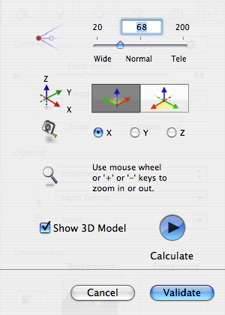
  • The insertion dialog enables you to define the focal distance of the image, gives you the option of adjusting the axes, and allows you to choose the reference axis, display the model and run/stop the calculation.

NB: When opening the dialog, the model from the preview window is hidden. The background image remains, with a marker for the axes, which appear in red, green and blue.

Insertion takes 2 steps: placement of a trihedron into the 2D view and into the Preview window.

  1. Setting the Axis Markers in the 2D View
  2. Setting the Marker in the Preview Window
  3. Running the Insertion Calculation


Artlantis User Guide : Site Insertion Tool

© 2008 Abvent www.artlantis.com