You are here: Animations Inspector > The Animation Inspector


21 - Animations Inspector

Animations: General Information

A sequence is defined by a camera: A viewpoint, an aim point and a focus distance.

Each sequence is considered an individual document with its own parameters:

 Animation List: for managing animations on the list shown.
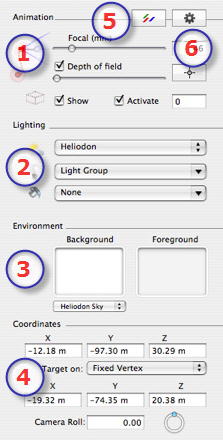
  1. Animations:
  • Depth of Field: Clickthen, in the Preview window, click to define the clear point of the scene, with the rest remaining blurred. The cursor adjusts the blur quantity.
  • Clipping Box: for defining clipping planes.
  1. Lighting:
  • To handle light schemes linked to the view, select them from the drop-down menus.
  • Heliodon:Llinks a heliodon to the view. The "None" item deactivates the heliodon.
  • Light Group: Links one or more light groups to the view. The "None" item deactivates the light groups.
  • Neon Shaders: Links one or more Neon Shaders to the view. The "None" item deactivates the lighting.
  1. Environment:
  • Handles the background and foreground of the scene.
  • Defining a background: Background type: 3D Sky, Gradient, 2D Image, 3D Image, 3D Cubic
  • ForegroundImages
  1. Coordinates:
  1. Post-Production:
  • Applies effects to the current viewpoint: The effects combine into, as well as with the parameters set in the inspector.
  1. Rendering Parameters:
  • Prepares the document for final rendering.

Working with Camera Paths in 2D View

Working with Light Paths in 2D View

Working with Object Paths in 2D View

The Timeline Window

Preview Window Shortcuts


Artlantis User Guide : The Animation Inspector

© 2008 Abvent www.artlantis.com